A Change Grade Request in Grado is a controlled, approval-based process for modifying grades that have already been submitted and locked.
It exists to:
Preserve academic record integrity
Maintain auditability and traceability
Ensure administrative oversight for post-submission changes
This process involves both faculty (who initiate requests) and administrators (who review and approve them).
A Change Grade Request is used when grades can no longer be edited directly, including:
Correcting errors discovered after grades are submitted and locked
Completing INC or conditional grades only if the final grade is already locked under the school’s transmutation rules
Applying Senior High School (SHS) intersession grades as an approved workaround when regular grading is finalized
Any situation where grades are locked and no longer editable
A Change Grade Request should not be used for:
Initial grade encoding while grades are still editable
Completing INC grades when the transmutation table allows direct final grade editing
Editing grades that remain editable in the Grade Book or Grade Sheet
Bypassing approval workflows or academic policies
Reopening grade books
Faculty members are responsible for:
Initiating change grade requests only when applicable
Verifying the correct academic year, term, student, and subject
Providing a clear and accurate reason for the request
Understanding that grades do not change immediately upon submission
Administrators are responsible for:
Reviewing all submitted change grade requests
Approving or rejecting requests based on school policy
Ensuring approved changes align with grading, reporting, and academic rules
A change grade request may be submitted only when all conditions are met:
The Grade Book is locked
The class is published
The grade has already been submitted
If grades are still editable via the Grade Book, corrections must be made directly, without using a change grade request.
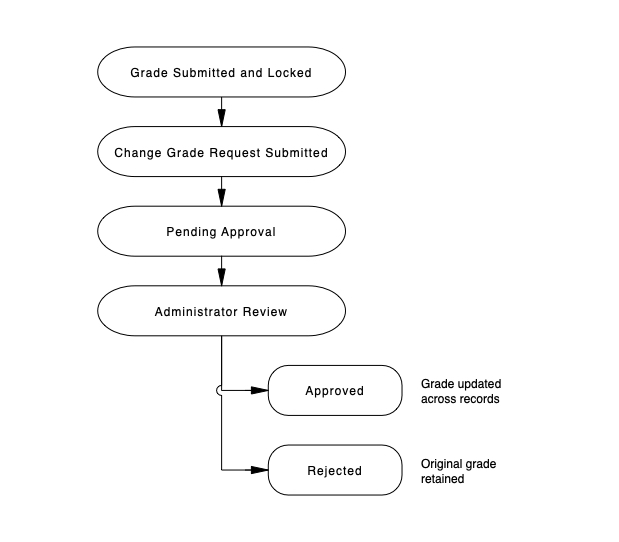
While a request is Pending, the original grade remains effective
Only approved requests update official academic records
Rejected requests result in no record changes
Once approved:
The new grade replaces the previously submitted grade
GPA, CGPA, and academic standing are recalculated as applicable
Official records (e.g., report cards, transcripts) reflect the updated grade as soon as re/generated
(subject to school reporting rules)
Completing an INC does not always require a Change Grade Request.
If the school’s transmutation table defines INC as a conditional verdict:
The final grade remains editable
No change grade request is required
If the grade has already been submitted and locked:
A change grade request is required
Schools should always follow their transmutation rules when determining the correct approach.
(When Grade Book Is Disabled)
When the Grade Book feature is disabled:
All grade encoding occurs in the Grade Sheet
Faculty may save or submit grades only once
Iterative editing is not available
Once submitted:
Grades become locked
Any correction requires a Change Grade Request
Best Practice: Faculty should verify all entries carefully before submission when the Grade Book is disabled, as corrections require administrative approval.
✔ Use change grade requests only after grades are finalized
✔ Provide a specific and descriptive reason
✔ Verify academic year, term, student, and subject before submission
✔ For intersession cases, update all required grade items
✖ Do not use change grade requests for editable grades
✖ Do not submit duplicate requests without resolution
| Scenario | Use Change Grade Request |
| Grade not yet submitted | ❌ No |
| Grade submitted and locked | ✅ Yes |
| Completing INC (conditional verdict) | ❌ No |
| Completing INC (finalized) | ✅ Yes |
| Initial encoding (Grade Book enabled) | ❌ No |
| Initial encoding (Grade Book disabled, submitted) | ✅ Yes |
| Bypassing approval rules | ❌ No |
Why didn’t the grade change immediately?
Change grade requests require administrative approval. Grades update only after approval.
Can administrators directly edit submitted grades?
No. Submitted grades must go through the change grade request workflow.
Will this affect GPA, report cards, or transcripts?
Yes. Approved changes propagate based on school reporting rules.
Can multiple requests be submitted for the same grade?
A visible edit (pencil) icon indicates the request is still pending. Updates are allowed, but requests should be finalized before review.

